


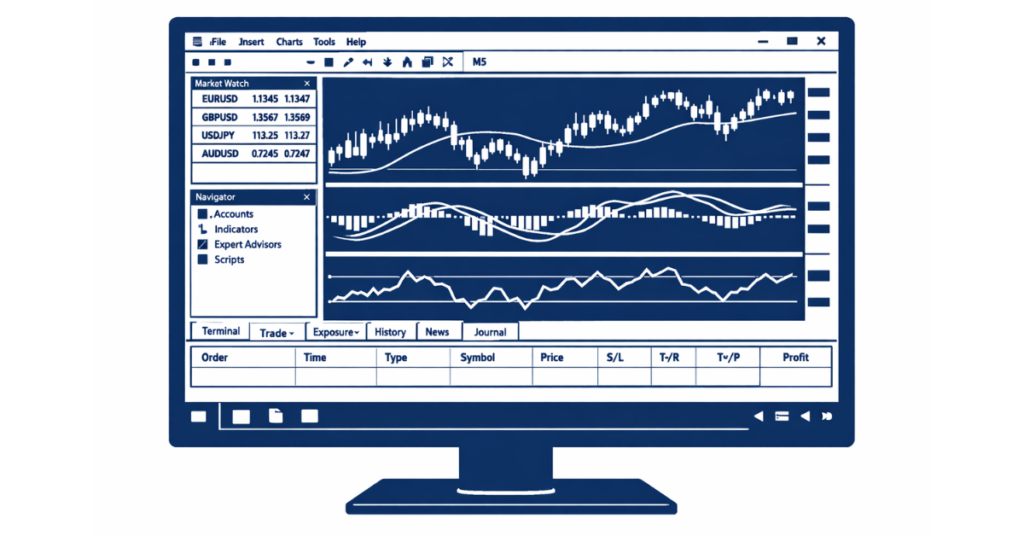
MetaTrader 5 system requirements for Windows include Windows 7, 8, 10, or 11 (64-bit recommended), a 1 GHz or faster processor, at least 2 GB RAM (4 GB recommended), around 1 GB free disk space, and a stable broadband internet connection for real-time trading and chart updates.
Key Takeaways
- MetaTrader 5 runs on Windows 7 through Windows 11, with best performance on 64-bit Windows 10 or 11.
- Minimum RAM is 2 GB, but 4–8 GB is recommended for multiple charts and indicators.
- SSD storage improves platform speed and historical data loading.
- CPU performance matters more when using Expert Advisors (EAs).
- VPS hosting is recommended for automated or 24/7 trading.
What Are the Minimum System Requirements for MetaTrader 5 on Windows?
If you are installing MetaTrader 5 on Windows, the official minimum requirements are modest, meaning most modern PCs can run it without issues.
Minimum Requirements Table
| Component | Minimum Requirement |
| Operating System | Windows 7, 8, 10, or 11 |
| Processor | 1 GHz or higher |
| RAM | 2 GB |
| Storage | 1 GB free disk space |
| Internet | Stable broadband connection |
| Architecture | 32-bit or 64-bit |
These minimum specifications allow MT5 to run, open charts, and execute trades. However, performance may slow down if multiple charts, indicators, or automated trading systems are used simultaneously.
Recommended System Requirements for Smooth MT5 Performance
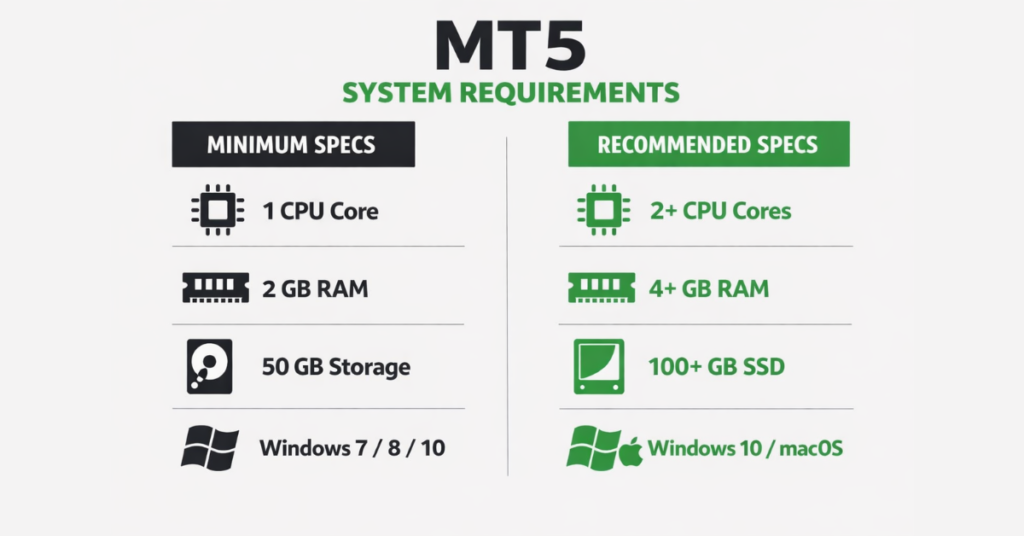
While MetaTrader 5 can run on minimum specifications, serious traders benefit from stronger hardware. If you trade multiple pairs, use custom indicators, or run automated strategies, upgrading beyond the minimum significantly improves execution stability and chart responsiveness.
For smooth and interruption-free trading on Windows, the recommended system requirements are higher than the basic setup.
Recommended Specifications Table
| Component | Recommended Specification |
| Operating System | Windows 10 or Windows 11 (64-bit) |
| Processor | Dual-core 2.0 GHz or higher |
| RAM | 4 GB minimum (8 GB ideal) |
| Storage | SSD with at least 5 GB free space |
| Internet | High-speed broadband (low latency) |
With 4–8 GB of RAM, MT5 can efficiently handle multiple charts, timeframes, and indicators without freezing. An SSD dramatically improves loading speed for historical price data and reduces startup time.
Why Recommended Specs Matter
If you are:
- Running multiple charts (10+ symbols),
- Using custom indicators,
- Running Expert Advisors (EAs),
- Backtesting strategies,
then CPU and RAM usage increase significantly. A faster processor ensures smoother tick data processing, while higher RAM prevents system bottlenecks.
Does MetaTrader 5 Work on Windows 7, 8, 10, and 11?
Yes, MetaTrader 5 works on Windows 7, 8, 10, and 11. However, performance and long-term stability are significantly better on Windows 10 and Windows 11, especially on 64-bit systems with updated drivers and security patches.
Windows Version Compatibility
MetaTrader 5 was built for the Windows environment, and it supports both 32-bit and 64-bit operating systems. That said, modern trading demands more system resources, making 64-bit Windows the preferred choice.
- Windows 7: Supported, but no longer ideal due to discontinued Microsoft security updates. Although MT5 can install on Windows 7, some brokers may not officially support outdated operating systems due to security and compliance standards.
- Windows 8: Compatible, though less commonly used today.
- Windows 10: Fully optimized and stable for MT5 trading.
- Windows 11: Fully compatible and performs efficiently with modern hardware.
32-Bit vs 64-Bit Windows for MT5
While MT5 can run on 32-bit Windows, it has RAM limitations. A 32-bit system typically cannot utilize more than 4 GB of RAM effectively, which may restrict performance during heavy trading sessions.
A 64-bit Windows system:
- Handles larger memory allocation
- Performs better under high chart load
- Supports smoother backtesting
- Reduces freezing during volatility
For traders planning long-term usage or automated trading, Windows 10 or Windows 11 (64-bit) is strongly recommended.
How Much RAM Does MetaTrader 5 Really Need?
MetaTrader 5 requires a minimum of 2 GB RAM to run on Windows, but real-world trading performance improves significantly with 4 GB or more. For traders using multiple charts, indicators, or automated systems, 8 GB RAM delivers noticeably smoother operation.
RAM Usage in Real Trading Conditions
The amount of RAM MT5 consumes depends on how you use the platform.
With basic usage one or two charts and minimal indicators MT5 can run on 2 GB RAM. However, once you begin adding:
- Multiple currency pairs
- Several timeframes
- Custom indicators
- Expert Advisors (EAs)
- Strategy backtesting
memory usage increases quickly.
On 2 GB systems, the platform may freeze during volatile sessions. At 4 GB, performance becomes stable for most manual traders. At 8 GB, MT5 can comfortably handle heavy technical analysis and automated trading.
RAM Recommendations by Trading Style
Casual / Beginner Trader
4 GB RAM is sufficient for smooth trading with a few open charts.
Active Day Trader
8 GB RAM is recommended for multi-chart monitoring and technical analysis.
Automated / EA Trader
8 GB or higher ensures stability when running Expert Advisors continuously.
Trading MT5 with a Stable Environment
When trading with a broker that supports optimized MT5 infrastructure, system performance becomes even more important. For example, trading on MT5 with Defcofx allows traders to access:
- No commissions or swap fees, with spreads starting from 0.3 pips. Conditions may vary depending on account type, instrument traded, and promotional terms. Traders should review the official Defcofx account specifications before opening an account.
- High leverage up to 1:2000, increasing capital flexibility. High leverage increases both potential profits and potential losses. It may not be suitable for all traders and should be used with proper risk management.
- Fast withdrawals processed within 4 business hours, including weekends
- Global access for traders worldwide
MT5 Hardware Requirements Explained (CPU, RAM, Storage)
MetaTrader 5 relies not only on RAM but also on processor speed and storage type to deliver smooth trading performance. Understanding how MT5 uses your system helps traders optimize their setup and prevent lag during live trading.
CPU Requirements
MT5’s performance depends heavily on processor capabilities:
- Minimum: 1 GHz processor. While 1 GHz is the official minimum requirement, modern trading environments involving multiple charts or EAs typically require significantly more processing power for stable performance.
- Recommended: Dual-core 2.0 GHz or higher
A faster CPU ensures quick processing of real-time tick data, smooth chart updates, and efficient execution of Expert Advisors (EAs). Traders running multiple charts or automated strategies will notice significant improvements with modern multi-core processors.
Storage Requirements
MT5 stores historical data, chart templates, and logs locally. Storage choice affects speed and performance:
- Minimum: 1 GB free disk space
- Recommended: SSD with at least 5 GB free space
Using an SSD reduces chart load times and ensures faster access to historical data for analysis or backtesting.
RAM Requirements
While RAM was covered in the previous section, it’s important to note that CPU, RAM, and storage work together. For instance, a system with fast RAM but slow storage will still experience delays when loading extensive historical data.
How to Download and Install MetaTrader 5 on Windows (Defcofx Guide)
Installing MetaTrader 5 (MT5) on Windows through Defcofx is simple. Following the correct steps ensures proper connection to the Defcofx trading servers and full platform functionality.
Step-by-Step Installation Guide
1. Download MetaTrader 5 From Defcofx
Go to the official Defcofx MetaTrader 5 download page.
Click the “Download for Windows” button.
The installation file (.exe) will automatically download to your computer.
Always download MT5 directly from the Defcofx website to ensure the correct server configuration.
2. Run the MT5 Installer
Locate the downloaded file (usually in your “Downloads” folder).
Double-click the file to begin installation.
If Windows asks for permission, click “Yes” to allow the installation to proceed.
3. Accept the License Agreement
Review the MetaTrader 5 license agreement.
Click “Next” to accept the terms and continue.
For most users, the default installation settings are recommended.
Advanced users may choose a custom installation folder, but this is optional.
4. Complete the Installation
The installation process will take a few moments.
Once completed, click “Finish.”
MetaTrader 5 will automatically launch.
5. Log In to Your Defcofx Trading Account
When MT5 opens:
- Click File → Login to Trade Account
- Enter your:
- Account number
- Password
- Server (select the correct Defcofx server provided in your account email)
If you do not yet have an account, you must first register with Defcofx before logging in.
Common Installation Issues and Solutions
Platform Cannot Connect to Server
Make sure you selected the correct Defcofx server during login. An incorrect server selection will prevent connection.
Firewall or Antivirus Blocking MT5
Your security software may block MT5 from accessing the internet. Add MetaTrader 5 to your firewall exceptions to enable real-time price updates.
Login Errors
Double-check:
- Account number
- Password (case-sensitive)
- Correct server selection
If login fails, reset your password through the Defcofx client portal.
Slow Performance
If MT5 runs slowly:
- Close unnecessary background applications
- Ensure stable internet connection
- Use a computer with sufficient RAM (at least 4GB recommended)
Trading MetaTrader 5 With Defcofx
Once MetaTrader 5 is installed on your Windows system, connecting it to Defcofx allows you to access professional trading conditions alongside MT5’s advanced tools. The combination of a powerful platform and competitive broker features creates a trading environment suitable for both beginners and experienced traders.
Competitive Trading Conditions
Defcofx offers cost-efficient trading with:
- No commissions
- No swap fees
- Spreads starting from 0.3 pips
These conditions help reduce overall trading costs, especially for active traders.
High leverage of up to 1:2000 is also available, allowing traders to control larger positions relative to their account balance. While leverage can increase potential returns, it also increases risk and should be used carefully.
Additionally, first-time deposits of $1,000 or more may qualify for a 40% welcome bonus, providing additional trading capital.
Global Accessibility and Support
Defcofx provides global access, allowing traders from many countries to open and manage accounts. Multilingual support helps ensure smooth communication and easier platform navigation for international users.
Fast Withdrawals and Execution
Withdrawals are processed within 4 business hours, including weekends, helping traders maintain liquidity and access their funds quickly.
When combined with MetaTrader 5’s advanced charting, automated trading capabilities, and fast execution, Defcofx offers an environment where users can:
- Execute trades efficiently
- Run Expert Advisors (EAs) reliably
- Monitor markets in real time
- Manage risk effectively
By integrating MT5 with Defcofx’s trading conditions, traders can operate in a stable and flexible trading ecosystem without performance limitations.
Open a Live Trading AccountFAQs
MT5 requires Windows 7, 8, 10, or 11, a 1 GHz processor, at least 2 GB RAM, around 1 GB free disk space, and a stable broadband connection. For smoother performance, 4–8 GB RAM and an SSD are recommended.
Yes, MT5 is fully compatible with Windows 11, especially on 64-bit systems. It benefits from improved memory usage and smoother multitasking compared to older versions.
A minimum of 2 GB is required, but 4 GB supports multi-chart setups for casual trading. For active traders running multiple indicators or Expert Advisors, 8 GB or more ensures stable performance.
Yes, MT5 can operate on a PC meeting minimum requirements, but trading speed and responsiveness may suffer. Upgrading RAM, CPU, or using an SSD will improve performance, especially with multiple charts or automated strategies.
Common causes include insufficient RAM, high CPU usage, slow storage (HDD vs SSD), too many open charts, background processes, or outdated drivers. Optimizing hardware and system settings resolves most performance issues.
MT5 is compatible with both 32-bit and 64-bit Windows versions. Using 64-bit Windows is recommended for better memory utilization and smoother operation during high-volume or automated trading.