


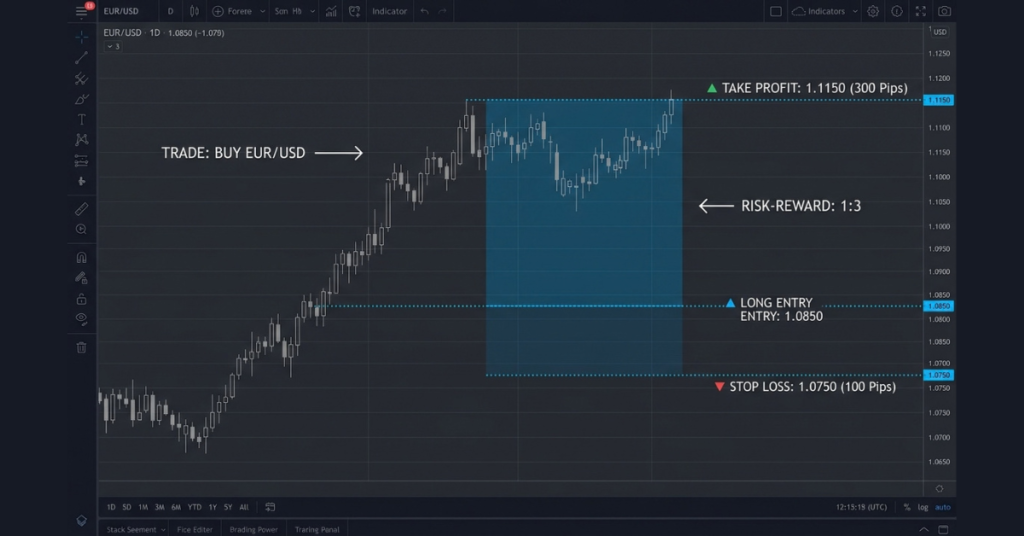
Take Profit and Stop Loss in forex are attached exit instructions: TP aims to close a position at a profit target, while SL seeks to limit an adverse move. Together they support a planned exit strategy, but gaps, slippage and trading costs can change the result.
Key Takeaways
- Stop Loss requests an exit at a selected price to limit risk; execution can produce a larger loss.
- Take Profit requests an exit at a selected target; it does not guarantee a net profit.
- Setting both before entering a trade is the foundation of structured risk management.
- The risk-reward ratio, calculated from your SL and TP distances, describes planned payoff distances; actual expectancy also depends on win rate, costs and realized exits.
- At a realized risk-reward ratio of 1:2, the break-even win rate is about 33.33% before costs.
- Both orders can be set when opening a trade on MetaTrader 5 or modified while the trade is live.
Why planning both exits helps
- Many traders set a Stop Loss to limit their downside and then skip the Take Profit, planning to exit manually when they are happy with the profit. Manual exits can be part of a tested strategy, but require discipline and monitoring. Here is why:
- A fixed TP can reduce impulsive exit decisions. A tested manual or trailing exit is another option, but it needs clear rules and reliable monitoring.
- Without an accepted protective stop, an adverse move can create a large loss before you react. An ordinary SL still cannot guarantee a maximum loss.
- Using both together gives you a defined risk-reward framework for every trade and reduces the need for continuous exit decisions, while margin, market events and order validity still require attention.
How Take Profit and Stop Loss Orders Work
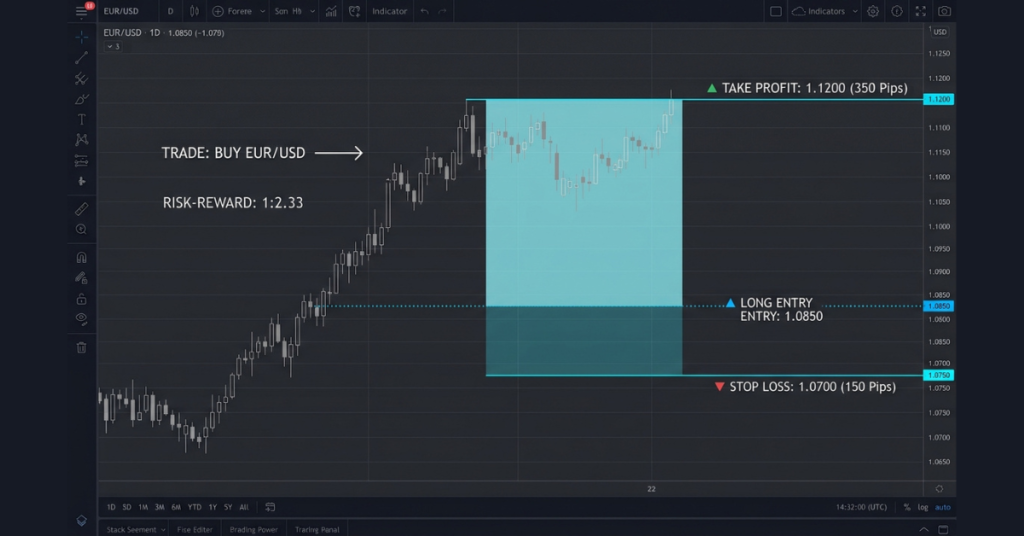
| Order | Trigger Condition | Purpose | Direction |
| Take Profit (TP) | Price reaches your profit target | Lock in gains automatically | Initially above entry for long / below entry for short |
| Stop Loss (SL) | Price moves against you to your loss limit | Limit the planned loss; actual loss can exceed it | Initially below entry for long / above entry for short |
Check Bid and Ask triggers
For forex positions, MT5 checks both TP and SL against Bid for a long trade and Ask for a short trade. A long TP sits above current Bid and its SL below current Bid; a short TP sits below current Ask and its SL above current Ask. These rules refer to current quotes, not necessarily the original entry.
After price moves favorably, an SL can be moved beyond entry to seek to protect a gain. A TP adjusted during a losing trade can also close below the original profit expectation. Neither label guarantees a profitable outcome. On a Bid-price chart, a short SL can trigger when Ask reaches it even though the visible Bid has not.
See the official MT5 order rules. Native TP and SL close the remaining position; separate partial-exit rules require suitable manual or automated handling.
Accepted fixed TP and SL instructions are held on the trading server and can operate while your platform is closed. Execution depends on trading hours, available prices and the broker’s rules. A triggered level is not a guaranteed fill price.
For a practical breakdown of TP orders specifically, see what is TP in trading and our dedicated article on forex risk management for the full framework.
Practice on DemoWhere to Set Your Stop Loss
Choose a stop level that fits the strategy, market structure and volatility. Then adjust position size to your planned money risk. A cash risk budget controls size; it should not force a stop so close that ordinary fluctuations repeatedly trigger it.
Method 1: Structure-Based Stop Loss
A strategy may place a long trade’s SL below relevant support or a short trade’s SL above relevant resistance. Select a level that matches the setup and timeframe, allowing for spread and normal volatility. Support and resistance are estimates, not guaranteed boundaries.
Method 2: ATR-Based Stop Loss
Average True Range (ATR) estimates recent volatility on the chosen timeframe. An ATR multiple can help scale stop distance, but a setting such as 1 or 2 times ATR is only a starting point for testing. It cannot predict a direction or guarantee room for every fluctuation.
Size positions to a risk budget
Choose a planned risk budget appropriate to your circumstances. A 1% example is illustrative, not a universal recommendation. If your account is $1,000 and you risk 1%, your planned risk is $10 before costs and possible slippage. Choose a justified stop distance, then calculate the position size to fit that dollar risk. If the broker’s minimum trade size is too large, skip the trade rather than forcing a tighter stop.
Calculate position size with EUR/USD
Suppose a USD account has $1,000 equity and an illustrative planned risk budget of $10. A long EUR/USD trade opens at Ask 1.1000, with SL 1.0970 and TP 1.1060. The distances are 30 and 60 pips, giving a planned risk-reward ratio of 1:2. One EUR/USD pip is 0.0001.
With a 100,000-EUR standard contract, one standard lot has a $10 pip value in USD. Position size is $10 ÷ (30 × $10) = 0.0333 lots before separate costs or slippage. If the symbol permits 0.01-lot increments, round down to 0.03 lots: planned price risk is $9 and target reward $18. Actual fills and costs can change both.
The example uses the executed entry Ask and closing Bid, so their difference already includes spread. Do not subtract that spread a second time. Check contract size, minimum volume, volume step and margin in the symbol specification. More leverage reduces margin requirements, not the loss per pip at a fixed lot size.
Where to Set Your Take Profit
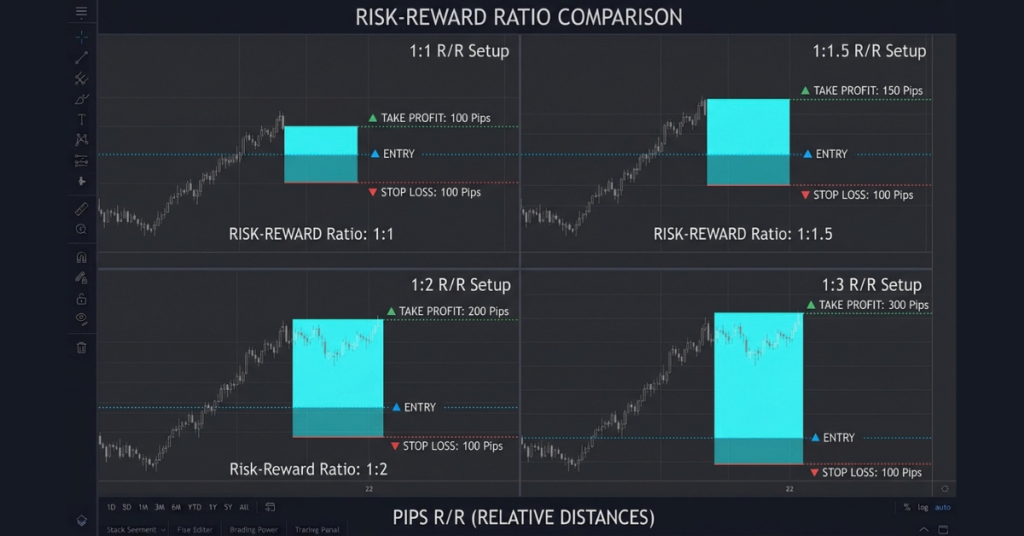
Compare the target suggested by your strategy with the stop distance. A desired risk-reward ratio helps assess the setup, but it does not create a realistic target. The image uses a 100-pip stop; the table illustrates the same ratios with a 30-pip stop.
| Risk-Reward Ratio | SL Distance | TP Distance | Win Rate Needed to Break Even Before Costs |
| 1:1 | 30 pips | 30 pips | 50% |
| 1:1.5 | 30 pips | 45 pips | 40% |
| 1:2 | 30 pips | 60 pips | 33.33% (before costs) |
| 1:3 | 30 pips | 90 pips | 25% |
The table above makes a critical point. If realized wins are twice realized losses, the break-even win rate is one-third before costs. A 34% win rate leaves only a small gross edge that costs or slippage can erase. These calculations assume consistent realized wins and losses. Assess actual results after costs rather than relying on planned targets alone.
The Most Common TP and SL Mistakes
- Moving the stop loss further away when price approaches it: This turns a planned small loss into a potentially large one. Avoid widening a stop impulsively to postpone a loss; any adjustment needs a tested rule and a fresh risk calculation.
- Setting the TP too close out of impatience: An unplanned early exit can reduce average reward. Follow tested exit rules, which may include a fixed target, partial exits or an earlier exit when the setup changes.
- Using the same pip distance for every trade: Market volatility changes. A 20-pip SL may be fine on EUR/USD at low volatility but dangerously tight during a news release.
- Skipping the SL on “confident” trades: Confidence does not remove market risk. Beginners should practice with an accepted protective stop and understand its execution limits.
- Placing TP and SL at round numbers only: Round numbers alone do not establish a suitable exit. A fixed offset of a few pips does not reliably prevent stop-outs. Base levels on the strategy, spread and volatility.
MT5’s native trailing stop adjusts the SL from a running, connected desktop terminal. When it disconnects, the last accepted server-side SL remains, but further trailing updates stop. A trailing stop limit is a different order concept and is not MT5’s native trailing feature. See our comparison of trailing stop loss vs trailing stop limit.
Explore Live AccountsSetting TP and SL on MetaTrader 5 (Defcofx Platform)
On desktop MT5, practice the following steps on a demo account. Labels and available fields can vary with execution mode:
- Press F9 to open New Order, or use the chart’s Trading menu and select New Order.
- In the order window, choose the instrument, volume and order type. Do not submit the order until its details and risk controls are ready.
- In the Stop Loss field, enter the price at which you want the trade to close on a loss.
- In the Take Profit field, enter the price at which you want the trade to close on a win.
- For a market order, submit with Buy or Sell after checking all fields. Place is used for pending orders; attached TP and SL apply to the resulting position when it opens. Check the broker’s permitted distances and execution mode.
- To change an open position’s exits, open Toolbox → Trade, right-click the position and select Modify or Delete. Enter the new SL and TP prices, click Modify, and verify the accepted S/L and T/P values.
Defcofx also offers a position size calculator to help you align your position size with your risk tolerance and SL distance before entering a trade.
Practice exit planning on Defcofx
Defcofx offers MT5 on its Silver and Gold accounts. Its account overview advertises spreads from 0.5 pips and zero commission and swap fees. Actual spreads vary, and low costs do not prevent trading losses. Check account conditions and local eligibility before opening a live account.
Final Thoughts on Take Profit and Stop Loss in Forex
Take Profit and Stop Loss work best as a pair because they define both sides of a trade before the market moves. The Stop Loss establishes where the trade idea is no longer valid, while the Take Profit sets a planned exit for the expected reward. Together, they turn an entry into a complete risk-reward plan rather than a decision based only on market direction.
The most important step is to place the Stop Loss according to market structure or volatility first, then determine the Take Profit using a suitable risk-reward ratio. A 1:2 or 1:3 setup can allow a strategy to remain profitable without requiring a high percentage of winning trades, provided the overall strategy has positive expectancy.
Common questions about forex exits
TP and SL are optional platform fields, but an accepted protective stop is a useful risk control. Some strategies use manual or trailing profit exits. Each needs clear rules; an ordinary SL cannot guarantee a maximum loss.
Yes, if average realized gains sufficiently exceed average realized losses after costs. With wins twice losses, break-even is about 33.33% before costs. A planned 1:2 target alone does not establish the strategy’s actual expectancy.
A gap can leave no tradable price at your stop level. The resulting exit may fill at a worse available price, increasing the loss. Ordinary stop losses do not guarantee their specified price or cap the loss.
Moving an SL to the opening price may reduce planned price risk, but costs and slippage can still produce a loss. Normal fluctuations may also trigger it early. Use tested adjustment rules rather than moving stops automatically.
There is no universal best ratio. Compare the strategy’s realized win rate, average gains, average losses and costs across representative trades. A larger planned reward can coincide with fewer target hits, so the target ratio alone proves little.
No. With the same position size, a wider stop increases planned money risk. Reducing size may maintain the risk budget. Choose a distance justified by the setup and volatility, then check the minimum volume and volume step.
Yes, MT5 lets you attach TP and SL to supported pending entry orders. They apply to the resulting position if the entry executes. Check permitted distances, margin and execution rules, then verify the accepted position’s exit levels.