


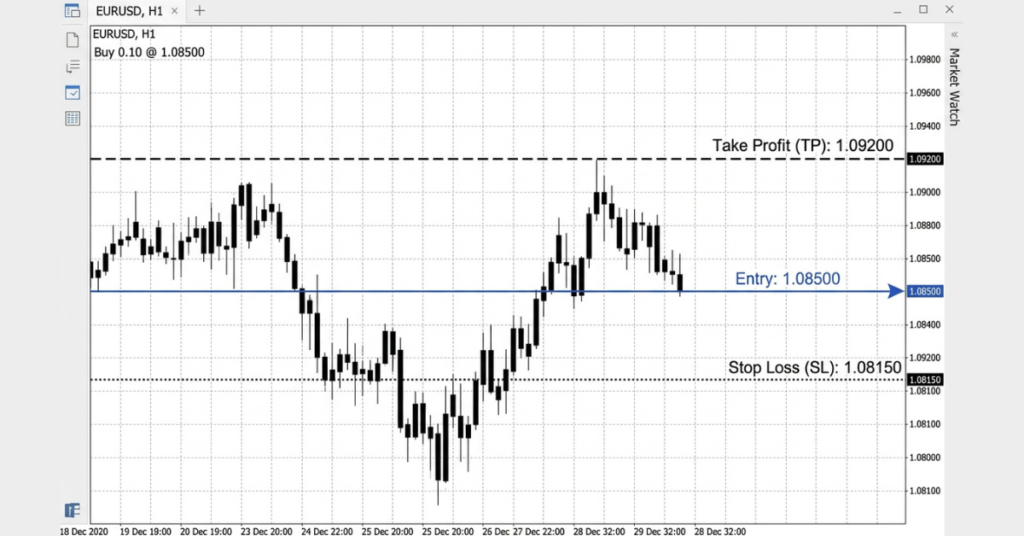
TP in trading means Take Profit: an exit instruction attached to a position or pending entry order. It aims to close the position at a price target. In forex, the trigger uses Bid for longs and Ask for shorts; execution and net profit depend on trading conditions.
Key takeaways
- TP (Take Profit) is an exit instruction attached to a position or pending entry order that automatically closes a trade at a predetermined profit target.
- Setting a TP can reduce discretionary exit decisions, but cannot prevent a winning trade from reversing before the target is reached.
- A TP and SL (Stop Loss) can define planned reward and risk, but neither proves that a strategy is profitable.
- On MetaTrader 5, the TP is set in the “Take Profit” field when opening a new order or can be modified after a trade is live.
- Possible target methods include support/resistance, previous swings, Fibonacci extensions and a planned risk-to-reward ratio such as 1:2.
- One native MT5 TP aims to close the entire remaining position. Scaling out requires separate position management; a trailing stop changes the SL, not the TP.
How take profit triggers in forex
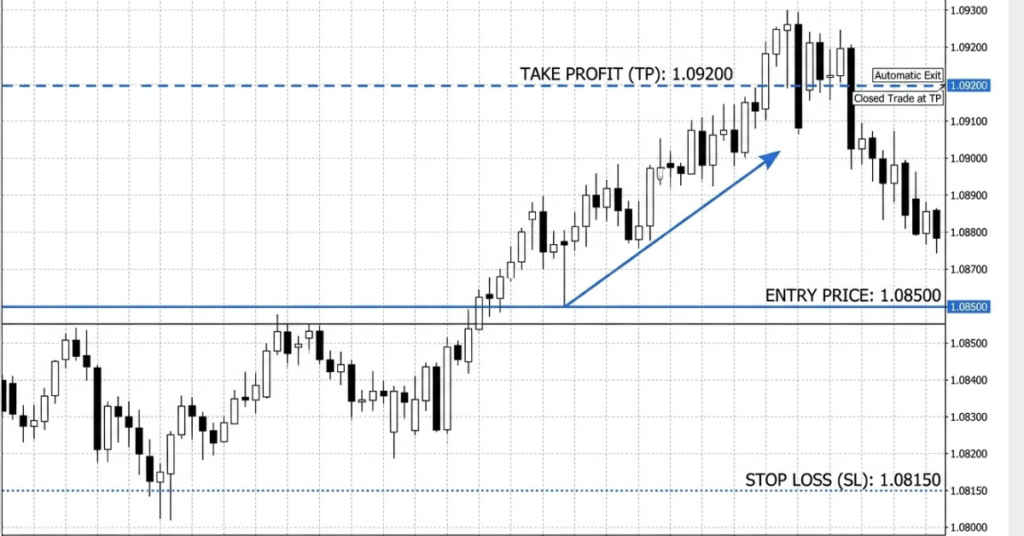
You can request a TP when opening a trade or add it later. Once accepted, the TP is held on the broker’s server and does not need your device to remain online. For forex in MT5, the long-position condition is checked against Bid and the short-position condition against Ask. Check the symbol’s execution rules and trading hours.
For a planned profitable long exit, the target is normally above the executed opening Ask. For a short exit, it is normally below the opening Bid. Accepted TP placement depends on the current closing-side quote and broker limits, not simply the original entry. The name “Take Profit” does not guarantee a positive net result.
Compare long and short EUR/USD exits
These hypothetical examples use executed opening and closing quotes. One EUR/USD pip equals 0.0001. At 0.10 lot, assuming 100,000 euros per standard lot and a USD account, each pip is approximately $1, so a 70-pip price gain equals $70 before separate fees or financing costs.
| Position | Executed entry | Example TP exit | Price gain |
|---|---|---|---|
| Long | Ask 1.0850 | Bid 1.0920 | 70 pips |
| Short | Bid 1.0920 | Ask 1.0850 | 70 pips |
The entry-to-exit quote difference already includes the spread effect; do not subtract it twice. These prices are examples, not trade recommendations or guaranteed fills. A Bid-based chart can appear to touch a short TP while Ask remains above it.
Why predefined profit targets matter
A predefined exit can help you follow a plan when price moves quickly. Two examples of discretionary exit problems are:
Holding too long: You are up 60 pips but you decide to hold for more. Price reverses, and you exit at 10 pips or even a loss.
Exiting too early: Anxiety pushes you to close at 20 pips when your plan calls for 60. Repeated early exits can reduce your average realised win and change the strategy’s results.
An accepted Take Profit helps automate your planned exit if its conditions are met. It can support consistent exit rules, but does not remove all emotion or establish that the strategy is profitable.
For more on managing trade risk, see our article on forex risk management, which covers position sizing, stop losses, and how TP fits into a complete trading plan.
Choose a take profit level
There is no universal rule for where to set a TP, but here are the main approaches traders use:
1. Compare support and resistance levels
Some traders compare a long target with resistance or a short target with support. They may place an exit before the level, allowing for spreads and volatility. Price can stop short or break through, so this approach needs testing rather than a fixed buffer for every trade.
2. Calculate planned risk and reward
If your Stop Loss is 30 pips from your entry and you want a 1:2 risk-reward ratio, your Take Profit should be 60 pips from your entry. This approach is independent of chart levels and defines a planned reward relative to the planned loss. It does not establish expected return: win rate, execution and costs also matter.
3. Calculate Fibonacci extension targets
Some traders use extension ratios such as 127.2%, 161.8% or 261.8% to calculate potential targets beyond a selected price move. Results depend on the anchor points and tool convention. These are mathematical reference prices, not forecasts that a continuation will reach them.
4. Compare previous swing highs and lows
A previous swing high can provide context for a long target, while a previous swing low can provide context for a short target. Earlier price reactions do not prove that the same level will hold again or reveal the exact cause of that reaction.
| TP Setting Method | Purpose | Key limitation |
| Key support/resistance | Compare targets with chart levels | Levels are subjective and can break |
| Risk-reward ratio (e.g., 1:2) | Define a consistent planned payoff | Requires sufficient win rate after costs |
| Fibonacci extensions | Calculate projected reference prices | Depends on anchors; price may never reach the target |
| Previous swing high/low | Compare exits with earlier extremes | Past reactions may not repeat |
| ATR-based (Average True Range) | Scale target distance to recent volatility | ATR uses past data and does not predict direction |
Set and modify take profit on MT5
On MT5 desktop, practise the following steps on a demo account first. Menu wording can vary by version:
- Press F9 to open New Order. Check the symbol, volume and order type.
- Enter a target price in the Take Profit field and check your Stop Loss. For five-digit EUR/USD quotes, 10 points equal one pip; avoid confusing points with pips.
- Submit the chosen order only after reviewing its details. After acceptance, check the T/P value in Toolbox → Trade; an invalid level can cause rejection.
- To change a TP, right-click the position in Toolbox → Trade, choose Modify or Delete, edit Take Profit, then click Modify. Confirm the accepted T/P value rather than assuming the request succeeded.
The official MT5 trading instructions cover modification and broker-defined stop-level restrictions.
Open a Demo AccountManage partial exits and trailing stops
Close part of a position
Scaling out closes part of a position while leaving the rest exposed. A native MT5 TP does not split one position into several target levels. Partial closing must respect minimum lot size and volume steps. Procedures differ between netting and hedging accounts; simply opening an opposite trade on a hedging account can create a new position instead of reducing the original.
See the official MT5 order principles for position accounting, TP triggers and trailing-stop operation.
Use a trailing stop alongside your plan
A trailing stop can move the stop-loss closer as price moves in your favour. It may reduce the amount of profit given back, but a triggered stop remains subject to execution conditions. It adjusts a stop-loss level rather than the TP and does not guarantee a profitable exit. MT5’s standard trailing stop needs the desktop terminal running and connected to update; the last stop accepted by the server remains in place if the terminal goes offline.
For a comparison of trailing order concepts on different trading systems, see our article on trailing stop loss vs trailing stop limit MT5’s native trailing feature adjusts a Stop Loss; it is not a separate trailing stop-limit order.
Practise take profit settings on Defcofx
Defcofx uses MetaTrader 5. Supported trades can include TP and SL instructions, subject to account terms, symbol restrictions and server acceptance. MT5 desktop also supports Expert Advisors for custom exit management. Such automation needs a suitable running environment and testing; it does not guarantee execution or profits.
| Feature | Defcofx Offer |
| Spreads | From 0.5 pips |
| Leverage | Up to 1:2000 on Silver and 1:500 on Gold; instrument limits apply |
| Commissions | Zero |
| Swap Fees | Zero |
| Welcome Bonus | 40% trading credit for eligible new clients’ first deposit of at least USD 1,000 or EUR 1,000. Request and receive it before trading; verification and country exclusions apply. Bonus credit is not withdrawable. |
| Withdrawals | Typically around 3 hours; withdrawal eligibility and processing conditions apply |
| Platform | MetaTrader 5 (MT5) |
| Account Types | Silver and Gold live accounts; demo accounts available |
Want to practise TP and SL settings with virtual funds? Open a free Defcofx demo account and practise in a simulated environment. Demo fills and the emotional impact of losses can differ from live trading.
Review the account conditions and full bonus terms before depositing. Check local eligibility and understand leverage and potential losses. Open a live account on Defcofx now.
Open a Live AccountConnect your profit target to a tested plan
A Take Profit gives a position a planned exit target. It can automate an accepted exit instruction, but it does not protect against losses before that target or prove a strategy is profitable. Check the trigger quote, lot size, execution policy and costs, then verify the TP shown on your position.
The important part is choosing the TP level logically. Support and resistance, previous swing highs or lows, Fibonacci extensions, volatility, and risk-reward targets can all help determine where a trade may reasonably end. A TP should therefore be connected to the market structure and overall strategy rather than selected simply because a particular price looks attractive.
Common questions about TP in trading
If the TP is not triggered, the position can remain open until another exit occurs, such as a manual close, stop loss, broker stop-out or contract expiry. Changing the TP does not itself close the position.
Neither method is universally better. A fixed TP supports predefined exits, while manual exits require monitoring and discipline. Compare both using tested results after costs, and keep a plan for adverse moves before the profit target is reached.
Yes, subject to broker limits and acceptance. On MT5 desktop, use Toolbox → Trade, right-click the position, choose Modify or Delete, update Take Profit and submit Modify. Verify the accepted value. Changing a TP does not lock in profit.
Do not assume a chart touch guarantees a fill or net profit. Check the relevant Bid or Ask trigger and the broker’s execution policy. Liquidity, gaps, trading hours and symbol rules can affect the resulting exit.
No universal ratio applies. A smaller average win requires a higher win rate to break even. A 1:2 planned risk-to-reward ratio needs more than 33.3% winners before costs, assuming every outcome equals the target or stop.
MT5 supports TP instructions with market and pending entry orders, including limit, stop and stop-limit types. Availability and placement limits depend on the symbol and broker. Check the specification and verify the accepted instruction on your position.
In MT5, TP is an exit instruction linked to a position and can be specified with a pending entry order. Buy Limit and Sell Limit are pending entry orders. Other platforms also use limit orders for exits; terminology varies.